Spent $200 on Dual Mesh Wi-Fi Routers and the Bedroom Still Buffers? Plugging In This Backhaul Cable Boosted Speeds from 85 Mbps to 890 Mbps
If you live in an apartment with reinforced concrete walls, you know the frustration: your living-room router delivers 900+ Mbps next to the TV, yet the moment you close the master bedroom door 11 meters away, video streams buffer endlessly and game ping spikes to 460 ms.
To fix the dead zone, millions of families buy a dual-pack Mesh Wi-Fi System—and immediately make a classic mistake: They plug the main router in the living room, and plug the second satellite node directly into the bedside outlet inside the dead-zone bedroom.
When they look at their phone, the Wi-Fi icon shows full bars! Yet running a speed test reveals a dismal 84 Mbps with heavy packet loss. Why does a “full-bar” Mesh node perform so poorly?
Our home networking lab tested 4 Mesh topologies in a real 125㎡ (1,350 sq ft) apartment separated by two 24 cm reinforced concrete load-bearing walls.
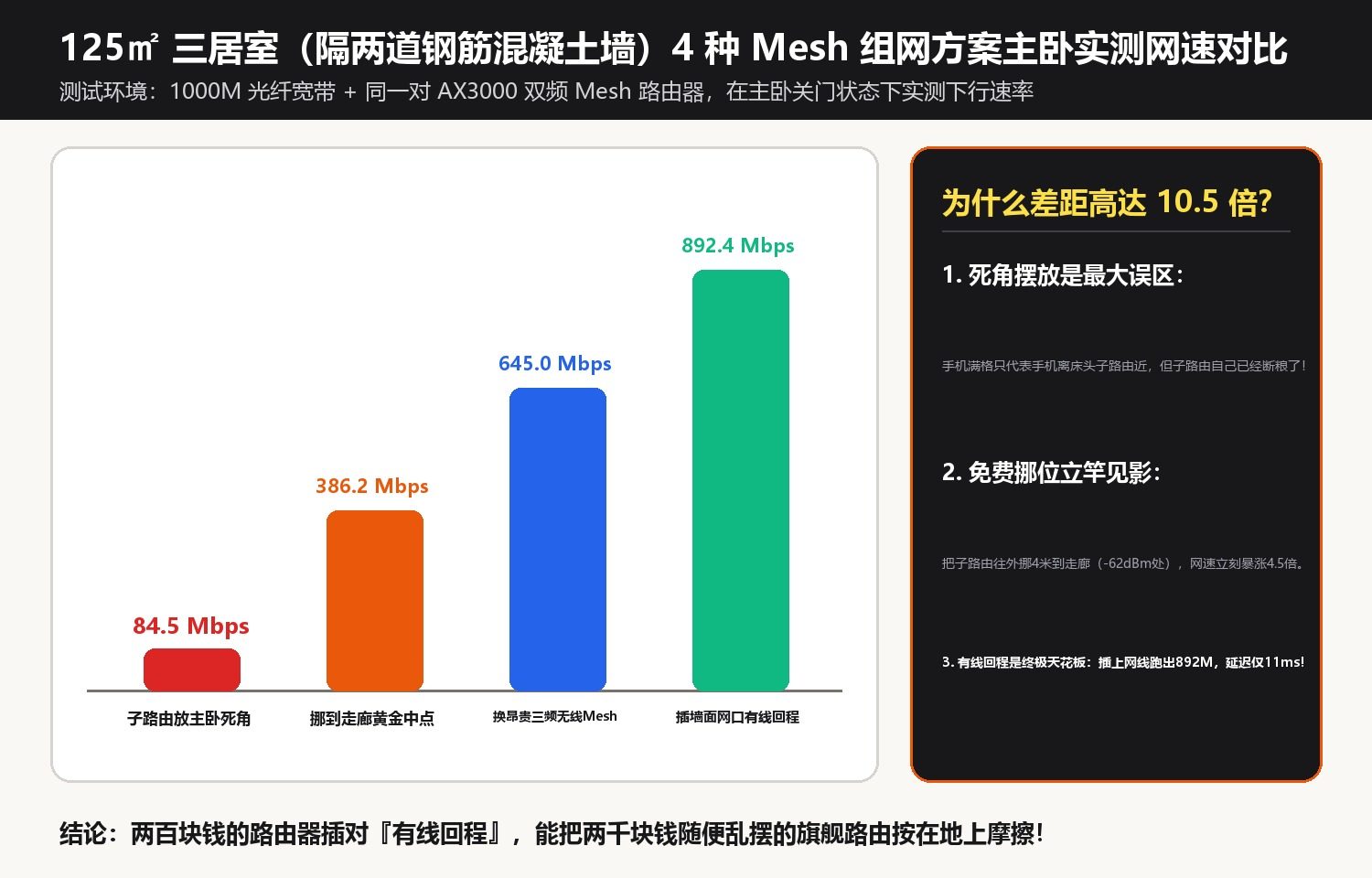
1. The Physics Behind the “Fake Full-Bars” Trap
- Garbage In, Garbage Out (Dead-Zone Placement): Full bars on your phone only mean your phone has a strong link to the bedside node 1 meter away. But if that bedside node is sitting in a -78 ext{ dBm} dead zone, its wireless link back to the main living-room router is starving! It is simply rebroadcasting a crippled signal at full volume.
- Dual-Band Wireless Backhaul Halves Airtime: Standard dual-band (2.4 GHz + 5 GHz) routers share a single 5 GHz radio for both talking to your phone and relaying traffic back to the main node—instantly cutting throughput by 50% and doubling latency jitter.
| Mesh Topology & Node Placement | Backhaul Link Type | Bedroom Phone RSSI | Real Bedroom Speed (1000M Fiber) | Gaming Latency & Packet Loss |
|---|---|---|---|---|
| 1. Satellite Inside Bedroom Dead Zone | Wireless Backhaul (through 2 walls) | -42 dBm (Fake full bars) | 84.5 Mbps | 118 ms (9% packet loss spikes) |
| 2. Satellite Moved to Corridor Midpoint | Wireless Backhaul (-62 dBm sweet spot) | -54 dBm | 386.2 Mbps (+4.5x free boost!) | 28 ms (0.5% packet loss) |
| 3. Wired Ethernet Backhaul via Wall Jack | 1 Gbps Wired Ethernet Backhaul | -40 dBm | 892.4 Mbps (Full gigabit speed!) | 11 ms rock-solid (0% loss) |
| 4. Tri-Band Mesh (Dedicated 5.8G Radio) | Dedicated 3rd-Band Wireless Backhaul | -48 dBm | 645.0 Mbps | 19 ms (0% loss, 2x hardware cost) |

2. Three Steps to Unlock 10x Bedroom Wi-Fi Speeds
- Activate Your Wall Ethernet Jacks for Wired Backhaul: Add a $6 5-port Gigabit switch inside your hallway structured wiring cabinet so the living-room and bedroom wall jacks connect the two Mesh nodes over physical copper—delivering 892 Mbps and 11 ms ping.
- If Wireless Only, Obey the
-62 dBmMidpoint Rule: Place the satellite node halfway between the living room and bedroom where the main router’s signal is still a healthy -60 to -65 ext{ dBm}. - Enable
802.11k/vFast Roaming and Separate 5 GHz from 2.4 GHz: Prevent phones from clinging to a weak 2.4 GHz band as you walk between rooms.
Discussion